[[TOC]]
Dialogs
Create an UI
Create a new UserControl via the template in Visual Studio. Then change the inherited class UserControl to FlyoutBase.
Properties
| Name | Type | Note |
|---|---|---|
ActionPanelVisible |
bool |
If true the default action panel will be visible.true by default. |
CancelButtonVisible |
bool |
If true the cancel button will be visible.true by default. |
CancelButtonEnabled |
bool |
If true the cancel button will be enabled. true by default. |
ConfirmButtonVisible |
bool |
If true the confirm button will be visible. true by default. |
Title |
string |
Set this to something other then null or "" to show the title bar and set it's title. The title will not be shown otherwise. |
TitleIcon |
Image |
Set this to something other then null to show the title bar and set it's icon. The icon will not be show otherwise. |
RegisterDialogAccept |
bool |
If true the cancel button will be registred as AcceptButton at the form it will be added to. true by default. |
RegisterDialogCancel |
bool |
If true the cancel button will be registred as CancelButton at the form it will be added to. false by default. |
Validation
The default action bar and its OK button calls a method to validate if it can be ok. It will only return ok if ValidateOK returns true. The base just always returns true, but you can overwrite this method and add your own checks.
protected override bool ValidateOK()
{
    // Validate inputs
    if (string.IsNullOrWhitespace(textBox_Name.Text)
        return false;

    // Save inputs
    myResult.Name = textBox_Name.Text.Trim();

    // Return success
    return base.ValidateOK;
}
Close
If you won't want to use the default action bar, you may want to close the flyout/dialog yourself. There is a method you can use for. Set the DialogResult to indicate why the flyout/dialog should be closed.
private void Button_Cancel_Click(object sender, EventArgs e)
{
    Close(DialogResult.Cancel);
}
Use the UI as flyout
This feature has not been finished yet!
Use the UI as dialog
Use the static DialogBase.Show<>() or DialogBase.Show() methods to open a dialog. This will use the provided istance or create a new one of the provided type.
var flyout = DialogBase.Show<MyFlyout>(listView_Accounts, strTitle, svgSymbol);
if (flyout.Result == DialogResult.OK)
{
    // ...
}
Events for prepair & result callback
There are some static events you can use to initialize a flyout or get back the some values.
public AccountManagerPage()
{
    DialogBase.DialogLoading += DialogBase_DialogLoading;
    DialogBase.DialogClosed += DialogBase_DialogClosed;
}

private void DialogBase_DialogLoading(DialogLoadingEventArgs e)
{
   if (e.Parent == this && e.Content is MyFlyout flyout)
   {
       // ...
   }
}

private void DialogBase_DialogClosed(DialogClosedEventArgs e)
{
   if (e.Parent == this && e.Content is MyFlyout flyout && flyout.Result == DialogResult.OK)
   {
       // ...
   }
}
Ensure you unregister your handlers from the event on Dispose or deconstructor!
~AccountManagerPage()
{
    DialogBase.DialogLoading -= DialogBase_DialogLoading;
    DialogBase.DialogClosed -= DialogBase_DialogClosed;
}
Symbols
Setup SymbolFactory
Create a new directory, we call it Symbols here.
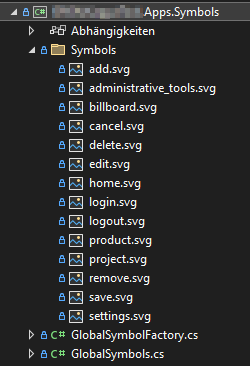 {width=188 height=275}
Ensure you add this to the project file. This will mark all PNG files within the Symbols folder as embedded resource.
<ItemGroup>
  <EmbeddedResource Include="Symbols\*.png" />
</ItemGroup>
Create a new enum. It may look like the following. Ensure you only add new values to the buttom as you will introduce a breaking change to your API otherwise.
public enum GlobalSymbols
{
    add,
    administrative_tools,
    billboard,
    cancel,
    delete,
    edit,
    home,
    login,
    logout,
    product,
    project,
    remove,
    save,
    settings,
}
The class GlobalsymbolFactory need to inherit from SymbolFactory<>. Provide your symbols enum here. You will need to overwrite GetImageResourceAssembly and GetImageRessourcePath as this parts can't be done by the base class.
public class GlobalSymbolFactory : SymbolFactory<GlobalSymbols>
{
    private static readonly string? symbolsNamespace = typeof(GlobalSymbolFactory).Namespace + ".Symbols";
    private static readonly string symbolsPathTemplate = "{0}.{1}.png";

    public override Assembly GetImageResourceAssembly()
    {
        return Assembly.GetExecutingAssembly();
    }

    public override string GetImageRessourcePath(GlobalSymbols svgImage)
    {
        return string.Format(symbolsPathTemplate, symbolsNamespace, svgImage);
    }
}
Access symbols
Accessing symbols esaily via an instance of your SymbolFactory implementation. You can either provide a static instance in GlobalSymbolFactory or create a new instance whenever you need it. Access via GetImage, decide whenever you can use an Image.
// Static instance in GlobalSymbolFactory
public static ISymbolFactory<GlobalSymbols> Instance { get; } = new GlobalSymbolFactory();
var img = GlobalSymbolFactory.Instance.GetImage(GlobalSymbols.billboard, SymbolSize.Default);

// Instance on-demand
var symbols = new GlobalSymbolFactory();
var img = symbols.GetImage(GlobalSymbols.billboard, SymbolSize.Default);